What I learned automating my personal vault with Claude Code
Skills, hooks, memory, and the FDE pattern behind a Claude-Code-powered Obsidian vault
Note: for narrative clarity, this post merges pipelines I keep strictly separate in practice. Audio recording and transcription don’t run on work meetings (company policy), and personal-context skills don’t run on work notes. The split is enforced by Obsidian selective sync and Claude Code hooks that gate which skills can read which folders.
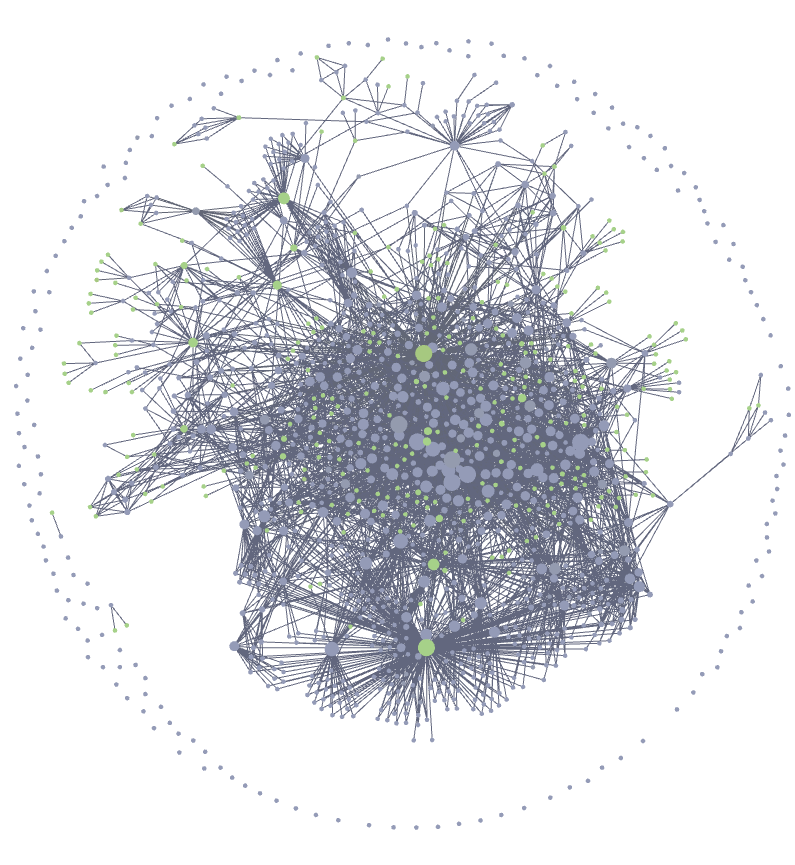
A personal knowledge vault is a graveyard by default. Mine was for years.
The failure modes are boring and universal. Daily notes typed in five hurried minutes, never reopened. Meeting notes with three action items buried under transcript dumps nobody scrolls. The same initiative re-explained every six weeks. A graph accumulating mass without curation, where every search returned the wrong file because nothing pointed at anything else.
The standard advice is discipline. Write better notes. Tag consistently. Review weekly. It has never worked for me, and I have evidence: a decade of half-built knowledge systems, each abandoned around week three when the tax of curation exceeded the value of retrieval. No working engineer will do curation reliably by hand.
The interesting question is whether a model that holds enough context can do that job instead. Not autocomplete or summary-on-request – curate: read what just got written, decide where it belongs, link it to the prior art, and maintain the graph a human will not maintain. The rest of this post is what happened when I took the bet seriously.
Why this stack, not Zapier
Zapier and IFTTT optimise for click-to-connect: pick a trigger, pick an action, map fields between two SaaS APIs. They assume the work is integration. The work I’m describing isn’t integration; it’s the model reading prose, applying judgement against a written contract, and producing more prose. Bolting an LLM call onto one node of a no-code graph doesn’t fix the architecture; it just moves the prompt into a text box nobody version-controls.
Five things make this stack structurally different.
Skills as the unit of action. A skill is a declarative
SKILL.mdfile with frontmatter (name,description,allowed-tools) and a prose body the model executes as a recipe. Not a node in a workflow graph; a procedure the orchestrator (itself a model invocation) decides when to call. Skills run in-process or fan out to subagents.Hooks as policy enforcement. A
SessionStarthook injects a system-reminder at the top of every session. In my vault, the literal string “signal density beats coverage; omit empty sections; do not restate frontmatter in the body” is pushed in before the model reads a single file. Hooks are how policy survives the next session, the next model version, the next agent. The shape that does this work, stripped down:
{
  "hooks": {
    "SessionStart": [{
      "matcher": "startup|resume|clear",
      "hooks": [{
        "type": "command",
        "command": "\"$CLAUDE_PROJECT_DIR\"/.claude/prose_linter.py --mode session-start",
        "timeout": 5
      }]
    }]
  }
}
Memory as persistence. Typed memory files (user, feedback, project, reference) live under
~/.claude/projects/.../memory/, indexed inMEMORY.md. The model writes its own notes on how I work, what I’ve corrected, what I’ve decided. The assistant accumulates a model of its operator.Templates as schema. Thirty-two Obsidian templates encode frontmatter contracts. Meeting notes, topic files, daily notes, goal files each have a fixed shape. The model doesn’t invent structure; it fills a schema.
CLAUDE.md as governance. One file holds the contract: naming, frontmatter rules, the two-read convention, disagree-and-commit, devil’s-advocate triggers, subagent defaults. Every session reads it first.
The same five layers work whether the substrate is a personal vault or a customer’s support knowledge graph.
The system, layer by layer
The system in numbers: 62 skills, 32 templates, 101 meetings processed, 218 topic files auto-linked, 266 task-as-file entries, 42 people files, 92 session-memory entries. The hero image at the top of this post is the resulting graph: a dense core of meetings, topics, people, and projects pulled into a connected mesh by topic-sync, people-sync, and link-dev-dialog. The outer ring of unconnected dots is the failure mode the graveyard version optimises for – notes that exist but point at nothing.
The catalog below walks one workflow at a time: meetings, framing, security and incident analysis, content, life-OS, hygiene. Each sub-section is one pipeline and the load-bearing design call inside it. First, how a slash command flows through the five layers.
Caption: How a single slash command flows through hooks, skills, templates, governance, and memory inside a Claude-Code-powered personal vault.
Meeting pipeline
An .m4a lands in Meetings/recordings/. The user invokes /process-meeting against the paired note. Seconds later: a populated meeting note exists, Topic and People files are created or updated, today’s daily note links the meeting, and if the meeting evidences progress on an active growth goal, one line lands in that goal’s Evidence log. One command, five sub-skills, one structured artifact graph.
Caption: A single m4a recording fans out through five composable skills, producing a populated meeting note, topic and people backlinks, a daily-note entry, and optional growth-goal evidence.
The orchestrator is small. It coordinates, it does not transcribe. The interesting design call is which sub-skills run in-process versus as background subagents:
Step 2 populate-meeting   (in-process, interactive)
Step 3 topic-sync         (subagent, background)
Step 3 people-sync        (in-process, interactive)
Step 4 enrich-daily       (subagent)
Step 5 link-dev-dialog    (subagent)
Interactive skills run in-process because a subagent’s “user” is the parent orchestrator, not the human at the keyboard. A confirmation gate inside a subagent either deadlocks, gets silently auto-approved, or gets hallucinated. The orchestrator pins the gate to the real user; everything else ships out to subagents for context isolation and parallelism.
What each stage does:
populate-meeting reads the transcript, fills frontmatter, writes Key Takeaways / To Do / Summary, and, gated by user approval, creates Task files for first-person commitments. ## Transcript and ## Scratchpad are then replaced with callouts; the audio stays referenced in ## Recording.
topic-sync extracts topic candidates, normalises them to Title Case, dedups against existing Topics/*.md, and creates or updates topic files with backlinks. This is where the two-read convention earns its keep: read lines 1-30, grep for ## Key Takeaways, then read from there to end. Raw transcripts are 10-50x the size of the structured top of a note, and full of disfluencies that pollute topic extraction. The convention is a token-budget control and a noise-floor control.
people-sync resolves first-names against People/*.md, prompts the user to disambiguate, then writes timeline entries and wiki-links names in the source note.
enrich-daily links today’s meeting into today’s daily note. link-dev-dialog runs a keyword pre-filter, then an LLM semantic check; if the meeting evidences progress on an active goal, one line lands in that goal’s Evidence log.
Scale: 101 meeting recordings have run through this pipeline; each produces roughly 3 structured artifacts on average.
Initiative framing dojo
Framing a new engineering initiative is where a lone author drifts into safe choices. The framing dojo is built around one load-bearing claim: adversarial sparring before structured writing. Most “AI helps you write a doc” tools draft first and critique second, which produces polished mediocrity. This pipeline critiques first and writes only after framing has survived attack.
Five stages, each with a single responsibility and a single artifact:
- dojo-prep. Research the codebase, ask targeted questions, produce
dojo-brief.md. - dojo. The sparring session. Challenges the problem framing (“is this the actual problem or a symptom?”), demands numbers (“how many users, how often, at what cost?”), stress-tests proposed controls (“what’s the failure mode if this fires?”). Produces
dojo-summary.md. - dojo-wrap. Re-reads the code for technical framing and produces the lean initiative document. Writing happens only after sparring.
- dojo-scout. Parallel architecture research. Spawns 3 sub-agents to explore implementation alternatives per surviving control. The second moment of multi-perspective analysis in the pipeline.
- dojo-adr. Expands the validated wrap output into a full ADR with functional requirements, implementation details, test plan, tasks.
The sparring stage is the loudest part. The prompting style is deliberately blunt.
Anchor gate -- do not proceed past it until all three hold:
- Problem statement with zero technology names
- An anchor number with units
- A credible answer to "what happens if we do nothing?"

If the human jumps to solutions: "We're not there yet. I still don't have a number."
If a number arrives without units: "A number without units is not a constraint."
If "what happens if we do nothing?" gets a vague answer: "What breaks, when,
  and how would you measure it?"
Caption: A five-stage adversarial pipeline turns a raw initiative topic into a full ADR, with the dojo-scout stage fanning out to three parallel research agents whose findings converge into a single tradeoff report.
The 3-agent fan-out inside dojo-scout is the first explicit appearance of parallel multi-perspective analysis as a deployment pattern. The same shape recurs in security-scan (4 agents) and incident-rate (3 agents).
Security and incident dojos
The security and incident dojos are the strongest case in the vault for parallel multi-perspective analysis as a deployment pattern. They share a shape: prep, adversarial sparring, multi-agent scan, synthesis. Both translate directly to enterprise scenarios: AppSec triage on one side, SRE runbook generation on the other.
The security dojo runs six stages. Each owns one artifact; a human reviews before the next stage starts.
- security-prep. Attack-surface mapping, dependency scan, trust-boundary identification.
- security-spar. Red-team sparring; challenges defenses, traces exploitation paths, maps attack chains.
- security-scan. Spawns 4 parallel specialist agents (injection, auth, infrastructure, holistic). A coordinator merges, de-duplicates, rates by CVSS plus organisational risk.
- security-wrap. Editorial pass produces the audit report; spawns exploit-writing agents to produce PoC scripts with
--verifymode. - security-strike. Executes every PoC against the live target, triages failures, fixes broken scripts, updates the report with verified outcomes.
- security-export. Converts the report to internal-wiki markup.
Spar runs before scan on purpose. The red-team pass shapes the threat model the specialist agents then hunt against, so the scan is targeted instead of exhaustive. Reverse the order and the scan misses chains while sparring has nothing fresh to challenge.
The coordinator never hunts vulnerabilities itself; it delegates and aggregates:
## Spawn 4 Parallel Agents

Launch all four agents in a single message (parallel execution). Each
agent gets the shared context block plus its own mission and checklist.

- Agent 1: Injection & Input Analyst
- Agent 2: Auth & Access Analyst
- Agent 3: Configuration & Supply Chain Analyst
- Agent 4: Holistic Security Analyst
Agent 4 has no checklist on purpose. It reads broadly, finds cross-cutting patterns the specialists miss, and produces a separate “Cross-Domain Observations” section. The convergence count (findings flagged by multiple agents) is itself a confidence signal in the merged output.
Caption: A six-stage pipeline turns a target into a verified audit report. Red-team sparring shapes the threat model first; then four parallel specialist agents fan out from the scan coordinator to hunt injection, auth, infrastructure, and holistic vulnerabilities; then exploit production, live execution, and internal-wiki export.
The incident dojo runs four stages with a tighter fan-out.
- incident-prep. Architecture map, failure domains, scenario inventory.
- incident-spar. Adversarial sparring on detection gaps, runbook completeness, cascading failures, ownership confusion.
- incident-rate. 3 parallel analyst agents (pessimist, pragmatist, optimist) rate likelihood and impact for each scenario; a coordinator aggregates by consensus and surfaces disagreements.
- incident-wrap. Structured playbook with per-scenario runbooks, risk matrix, ownership.
The three-rater design matters. A single LLM rater is overconfident and biased by recency. Three raters with explicit dispositions act as a calibrated panel: the pessimist drags scores up where cascading failures are plausible, the optimist drags them down where existing controls actually fire, the pragmatist holds the middle. Disagreement is signal; the coordinator surfaces it instead of averaging it away.
Caption: A four-stage pipeline turns a service into an incident playbook, with three parallel analyst agents (pessimist, pragmatist, optimist) rating each scenario before a consensus aggregation feeds the final risk matrix and runbooks.
Cap concurrency at 4. Past that, agents re-discover each other’s findings and the coordinator spends more tokens de-duplicating than the marginal agent contributes.
Content production pipeline
Writing in public is the hardest place for AI-generated text not to slip into AI tone. A LinkedIn post is short, opinionated, and personal: the format where the usual offenders are most obvious. The content pipeline runs idea-mining, drafting, refinement, visuals, and humanisation, with a feedback loop that mines manual edits back into the style profile.
The shape:
- Two parallel idea sources.
mine-vaultscans recent notes for opinions, decisions, recurring themes.mine-hnreads Hacker News top-comment debates for post-able tensions. draft-postcreates the file from a template, writes a first draft against the loaded style profile, and self-reviews against a hard-coded ban list (no emojis, no engagement bait, no AI-isms).refine-postruns a 5-part audit (emoji, engagement bait, AI-isms, structure, coherence) and waits for confirmation before applying fixes.post-visualsgenerates Mermaid diagrams and code screenshots via a Slidev deck, exports portrait-format PNGs, then cleans up the build artifacts.humaniseruns a 60+ entry tell catalogue across vocabulary, sentence-shape, structural, and typography categories.publish-postflips the lifecycle field topublishedand records the URL and date.
Caption: Two idea sources feed a draft-refine-visualise-humanise-publish chain, while learn-style closes the loop by mining manual edits back into the style profile that draft-post and refine-post consult.
The cross-cutting skill is learn-style. After a human edits a draft, it diffs the saved snapshot against the new draft and classifies each change as Added, Removed, Rephrased, or Reordered. A pattern requires at least 2 posts to be stable. Patterns confirmed across two or more posts get appended to a style profile that the next draft-post run reads. RLHF-from-edits at single-user scale.
The same shape (multi-source idea mining, generate, critique, render, humanise, ship, with a feedback loop on edits) is what a customer’s content-marketing or RFC-drafting pipeline looks like.
Personal Life-OS
The point here is not productivity. It is entity tracking with expiries: the same shape that runs a personal subscription list is the shape that runs customer-contract renewals at enterprise scale.
add-asset creates a typed note for one of six fixed domains (vehicle, housing, health record, finance account, document, subscription). The closed enum is deliberate: adding a domain is a vault-structure change, not a per-item decision. Frontmatter captures expiry-style fields: insurance_expires, lease_ends, next_review, expires, renews.
log-event appends one dated entry to an asset’s ## Log in a strict inline-bracket-field format. Dataview cannot parse markdown tables, so the shape is the contract. The rule shows up in every customer-facing system that needs queryable history: pick one indexable format and refuse all others.
personal-due scans Personal/**, buckets expiry fields into overdue / this week / this month / next 90 days, and writes a digest into today’s daily note. Idempotent, safe to run on a /loop 24h cron.
personal-sync mirrors people-sync for non-human entities: detects asset mentions in arbitrary notes, wiki-links them, optionally appends a backlink row on the asset side.
check-intent, review-intents, and reflect-intent close the loop on decisions before the entity exists. Sparring before purchase, queue walk after the cooling-off window, retrospective at 7/30/90 days. The behavior report aggregates outcomes so future sparring cites real numbers.
Entities, events, expiries, surveillance, decision controls. The same shape covers contract renewals, compliance attestation cycles, license-expiry tracking, and supplier onboarding.
Vault hygiene
A vault that needs constant manual cleanup stops being a system. The hygiene tier keeps the stack working without me babysitting it.
trim drops empty non-skill-anchored sections, kills placeholder bullets, removes lines that just restate frontmatter. It never drops a named person, date, decision, or action item; the preservation filter sits above every proposal.
humanise is the AI-ism remover from the failure section. Dehedging is hygiene, not garnish.
sync-vault detects vault changes since the last snapshot and updates CLAUDE.md (structure tree) and claude/templates.md (template schemas). The vault tells the model how it has grown; the model updates the contract.
Without hygiene the schema rots: stale templates, dangling links, frontmatter restatements that nobody removes, and within a month the contract no longer matches the vault.
Governance and observability
A deployable AI runtime needs a deployment contract. Three files do that work: CLAUDE.md, MEMORY.md, and a session log called project-memory.md. Pull any one out and the runtime collapses into a stateless chatbot.
CLAUDE.md is the contract. It pins file-naming in a table, frontmatter rules (dates as YYYY-MM-DD, tags as lowercase hyphenated arrays, ratings on a 1-5 scale), and the two-read convention for long meeting notes. Behavior rules sit alongside. Disagree-and-commit is explicit: push back once with a concrete alternative, then execute. Devil’s-advocate has named triggers (irreversibility, blast radius, schema or public-API changes, data migrations) so the model challenges on evidence, not for the sake of balance.
Memory is the audit trail. Typed files (user, feedback, project, reference) indexed by MEMORY.md. Each file looks like:
---
name: terse-output-preference
description: user wants short responses and trim artefact bodies
metadata:
  type: feedback
---
The metadata type makes it queryable; the index keeps the model from re-reading everything to find one fact. Corrections compound instead of evaporating at the end of a session.
project-memory.md is the forensics layer. Every session appends ### YYYY-MM-DD -- <topic> followed by 3-5 bullets covering lessons, gotchas, patterns. The next session reads it first, so old ground is not re-litigated.
Tie it back to the FDE thesis. The conversation is ephemeral; the contract is what survives it. Naming rules, behavior triggers, memory schema, and session trace: these four pieces are what an operator inspects on Monday to understand what shipped. Without them, every session starts from zero and nobody can audit what the model did on Friday.
Honest failure: where the substrate had to grow teeth
The first months of generated prose were embarrassing. Every note read like marketing copy. Em-dashes everywhere. Closing sections that already summarised themselves. Meeting notes ended with hollow alignment lines that said nothing and took a line to say it.
Asking the model nicely works for about one session. Per-prompt instructions decay; the substrate does not.
So the substrate grew teeth. humanise catches em-dash overuse, mechanical tricolons, “It’s not X, it’s Y” constructions, the Rule of Three when it runs too clean. trim drops empty sections, placeholder cruft, hedging filler, frontmatter restatement; preservation rules block dropping any named person, decision, action item, date, ticket ID, URL, or anything inside code or Mermaid. refine-post runs a 5-part quality check on LinkedIn drafts.
The load-bearing piece is none of these. It is a SessionStart:clear hook. Every fresh session, before the first turn, the hook fires and Claude Code surfaces the script’s stdout as a system-reminder. The script emits:
[prose-linter] Output style reminder: signal density beats coverage; omit empty sections; do not restate frontmatter in the body. See CLAUDE.md > Output Style.
(In the transcript that line appears prefixed with SessionStart:clear hook success: because that’s how the harness frames hook stdout.) That single line is the difference between asking the model to behave and making the substrate enforce it. The skills clean up drift once it’s there; the hook keeps it from starting.
The second earned failure is older and uglier: memory drift. An early feedback_ entry encoded a one-time correction (“avoid backticks around skill names in casual prose”) as a permanent rule. Later sessions applied that rule everywhere, including inside technical contexts where backticked skill names were the entire point. The model was not wrong to read the memory; the memory was wrong to claim global scope. The fix lives in CLAUDE.md now as a staleness rule: before recommending from memory, if the entry names a path, symbol, or flag, verify it still exists. Memory entries get scoped on write. Without that rule, the corruption would have compounded silently into every skill that read the same file.
The pattern is one sentence: lint the generated artifact, don’t trust the generator.
This is the FDE shape. When you deploy Claude into a real workflow, the interesting failure modes are not in the model. They are in the substrate around it: hooks, linters, governance contracts. Builders who internalise that earlier ship better systems.
What this would look like at customer scale
The personal version of this vault is a deployment substrate, not a productivity hack. The pipelines that organise my notes are the same pipelines a customer needs when their domain is regulated, high-stakes, or bigger than any one human can hold in working memory.
Meeting pipeline to account knowledge management. Every customer call produces a structured artifact: decisions, blockers, action items, sentiment, linked back into the account’s topic graph and the owning rep’s focus list. The two-read convention survives at scale because downstream operations on a thousand call notes can’t afford to re-read transcripts. Account history stops collapsing on handoff.
Framing dojo to PRD and RFC stewardship. The artifact is concrete: a PRD or RFC draft. The AI panel substitutes for the spec-writing engineer’s lone first draft, the version that used to land in human review with every easy objection still embedded. The dojo refuses to let a draft past anchor gate without a problem statement that names no technology, an anchor number with units, and a credible answer to “what happens if we do nothing?”. An RFC sparred against by an adversarial panel reaches human review with roughly three times the engineering pushbacks already absorbed; by the time a principal engineer reads it, only the substantive objections remain.
Security dojo to AppSec triage. Prep maps the attack surface; red-team sparring shapes the threat model; four specialist scans run in parallel against that model. Exploits get written and executed against a real target. The audit ships with verified exploits attached, so the engineering team triages real vulnerabilities instead of debating CVSS scores on theoretical ones.
Incident dojo to SRE runbook generation. Scenario sparring challenges detection gaps, runbook completeness, ownership, cascading failures. Risk rating runs as a three-analyst consensus so the score is not a single over-confident guess. The output is per-scenario runbooks plus a risk matrix the on-call team can defend in a post-incident review.
Personal Life-OS to compliance, contract, and supplier entity tracking. Entities have expiries; events live on a structured log; a surveillor sweeps and buckets findings by urgency; decision sparring runs before financial or contractual commitments. Renewals, license expiries, and attestation cycles stop falling through the cracks because the substrate refuses to let them.
The patterns are portable because they are not about my domain. Declarative skills with explicit triggers, parallel multi-agent analysis with consensus aggregation, hook-based policy enforcement, governance contracts that survive model upgrades, memory persistence across sessions: each shape is reusable across verticals. A Forward Deployed Engineer walks into a customer with these shapes already loaded as muscle memory from running them daily against their own life, and turns them on against whatever the customer’s actual problem turns out to be.
Coda
The shift that matters is small to describe and large in practice. A chatbot is something you talk to. A runtime is something you deploy against, with a contract about what it can read, what it can write, and what it must refuse. Skills become the unit of capability. Hooks hold the policy. Memory turns into a substrate you design. Once those pieces exist, the question stops being “what can the model do” and starts being “what shape do I give this system so that a non-engineer can use it without me supervising every step”. A boring engineering question, which is the point. The interesting work moves up a level: deciding which workflows deserve a runtime at all, and writing the governance that keeps each one honest. Everything else is just files on disk and a model that knows how to read them.